Save A Lot
Moran FoodsFood & Drink
4.51.16K Reviews
- Version
- 1.9.1
- Installs
- 500.00K
- Age Rating
- Mature 17+
Screenshots
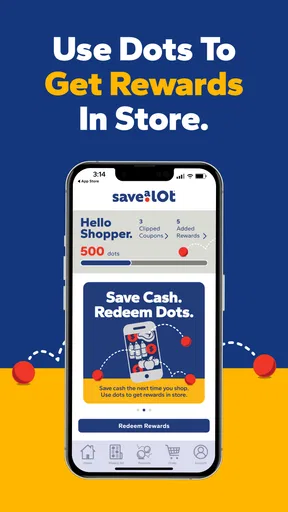

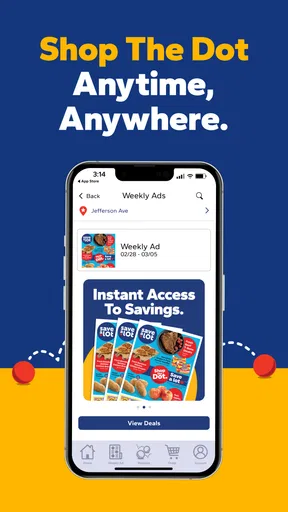
Our Review of Save A Lot
 Analysis by Appyee
If you are trying to spend less on groceries without turning every shopping trip into a research project, Save A Lot is worth a look. I approached it as a practical Food & Drink app, not as a replacement for the store itself, and that distinction matters. Its purpose is to help shoppers find savings and rewards connected with Save A Lot, giving you a reason to check the app before heading out rather than relying only on memory or paper promotions.
My first impression was straightforward: this is aimed at people who already shop at Save A Lot or are considering making it part of their routine. The app is free, comes from Moran Foods, and has built a sizeable audience, with more than half a million installs and an average rating of 4.5 from roughly twelve thousand ratings. Those figures suggest that the basic idea is useful to many shoppers, although popularity does not remove the need to see whether its saving style fits the way you buy groceries.
Save A Lot is currently listed as version 1.9.1 and works on devices running Android 10 or later. It carries a Mature 17+ content rating, which is something parents and people using shared devices should notice before installing. The app was released on June 13, 2024, so I would treat it as a relatively recent digital companion rather than a long-established budgeting platform with years of personal finance tools behind it.
What to expect before you install
The central promise is simple: the app gives you ways to save and rewards to look for while shopping. In practical terms, I would expect it to be most useful as a pre-shopping checkpoint. Instead of walking into the store and hoping you remember which offers matter, you can make checking the app part of the same routine as writing a grocery list.
That makes it different from a general coupon aggregator. A broad coupon app may collect deals from many retailers, but it can also leave you sorting through promotions that do not apply to your preferred store. Save A Lot is narrower, and that narrow focus is its advantage when your grocery trip already includes this chain. You spend less time filtering unrelated offers, but you also get less value if you normally shop across several supermarkets and want one app to compare them all.
I would not install it expecting a complete household budgeting system. Its role is closer to a store-specific savings and rewards companion. If you need meal planning, pantry tracking, detailed spending charts, or price history across competing stores, another tool will probably serve you better. For a shopper who mainly wants to make a Save A Lot visit more deliberate, the focused approach feels more sensible.
The free price removes the biggest barrier to trying it. Still, “free” does not automatically mean every saving opportunity will suit every basket. A deal is only useful when it matches something you genuinely need, and rewards are easiest to appreciate when you use the app consistently instead of opening it once and forgetting about it. My advice is to judge it by the amount of effort it saves you, not by the number of offers you can see.
The right user profile
This app makes the most sense for a regular Save A Lot shopper who wants a repeatable routine. It can also help someone who has recently moved, is building a lower-cost grocery habit, or wants a quick way to check store-related savings before leaving home. The benefit is less obvious for a person who shops wherever the weekly price happens to be lowest, because a store-specific app cannot replace broad comparison shopping.
I would also think about your shopping style. If you buy the same staples every week, a rewards-focused app can be easier to use than a large coupon service full of distractions. If your basket changes constantly, you may need to spend more time checking whether the available savings fit your plans. That is not a flaw unique to this app; it is the trade-off that comes with targeted offers.
Getting started without making the first visit complicated
After installing the app, I recommend setting it up when you are not already standing in the checkout line. The best first session is calm and short: open the app, look through the available savings and rewards, and identify one or two things that could affect your next grocery trip. Trying to understand everything at once is unnecessary and can make a simple tool feel more demanding than it is.
Before you shop, keep your normal list beside you. I find this important because savings apps can encourage impulse buying when the user starts treating every promotion as a reason to add something. Your list should remain the decision-maker. Use the app to improve the cost of planned purchases, not to create a second shopping list made entirely of tempting discounts.
A useful setup habit is to choose a single test category for the first visit. For example, you might check the app while planning breakfast items, household basics, or ingredients for a weekend meal. This gives you a clear way to judge whether the app is helping: did it make one planned purchase easier to save on, and did the checking process feel reasonable?
Because the app is tied to a particular retailer, I would also confirm that your intended shopping trip is actually at Save A Lot before spending time reviewing offers. That sounds obvious, but it prevents a common mistake with store-specific tools: preparing around an offer and then changing stores because of a better overall basket price. The app works best when it supports your store choice, not when it makes that choice for you.
Your first meaningful success
The first useful result should be modest. Open the app before a planned visit, review the savings and rewards that appear relevant, and choose one item already on your list. Then keep the rest of the trip normal. This approach lets you learn the workflow without turning your first attempt into a major couponing session.
I would take a quick note of what you intended to use before entering the store. Even a short mental reminder helps you distinguish between an offer you deliberately checked and a discount you merely noticed. That distinction becomes valuable later, because you can decide whether the app genuinely improved your planning or simply added another screen to your routine.
For a realistic example, imagine that you are shopping after work for a few dinners and basic breakfast supplies. You open Save A Lot at home, look for relevant savings, and adjust your list only where the offer matches food you were already going to buy. At the store, you follow the list rather than browsing every possible promotion. The success is not a dramatic “hack”; it is arriving at checkout with fewer forgotten opportunities and less last-minute decision-making.
The most reliable habit is to check before building the basket, not after. Looking beforehand gives you time to decide whether a saving fits your meal plan. Looking only at the register can create pressure, especially if you are trying to remember several details while other shoppers are waiting. A few quiet minutes at home are more useful than a rushed search in the final stage of the trip.
How to make rewards work for your routine
Rewards are easiest to manage when you attach them to a regular shopping rhythm. I would choose one moment, such as weekly meal planning or the evening before a usual grocery trip, and make that the time to review the app. A consistent trigger is more effective than hoping you will remember whenever you happen to need groceries.
Another practical tip is to separate “interesting” from “useful.” An offer can look appealing and still be irrelevant to your household. I would ask three questions: Was this item already on my list? Will I use it soon? Does using the offer make the trip simpler rather than more complicated? If the answer is no, skip it. The app should reduce waste and overspending, not encourage purchases that would not otherwise happen.
For families, the app can also work as a planning reference before someone else does the shopping. If one person prepares the list and another visits the store, checking the relevant savings together can reduce misunderstandings. The person shopping knows what to look for, while the person planning the meals keeps control of the budget. That shared workflow is more dependable than sending a vague message such as “check the app for deals.”
Where first-time users may hesitate
The biggest possible friction is not the installation; it is understanding how much attention the app deserves. Some shoppers will open it expecting instant savings with no preparation, while others may spend too long browsing. I think the best middle ground is to use it as a filter: start with your list, inspect only related savings, and stop once you have made the trip more purposeful.
Another point to keep in mind is that a store-specific reward program may not match the way every household buys food. If you compare several retailers on every trip, Save A Lot may be one part of your process rather than the main tool. In that situation, a general price-comparison method can be better for deciding where to shop, and this app can still be useful afterward if Save A Lot wins the comparison.
People who dislike account-based shopping routines may also find the experience less appealing than simply checking a weekly circular or asking about promotions in the store. The convenience comes from having savings information available in an app, but convenience only appears when you remember to open it. If you rarely use mobile tools while planning groceries, the traditional method may feel faster.
I would not let the 4.5 average rating create unrealistic expectations. Ratings tell me that many users are satisfied, but they do not guarantee that every offer will fit my basket or that every shopping trip will feel equally smooth. My own standard would be practical: after several normal visits, is the app helping me notice relevant savings without adding more planning work than it removes?
Privacy, age rating, and everyday suitability
The Mature 17+ label is worth noticing even though this is a grocery app. If a teenager uses a family phone or a shared device, I would check the store presentation and household settings before assuming it is intended for younger users. For adults, the rating is simply part of deciding whether the app fits the device and account environment you use for shopping.
I also prefer to install and review shopping apps away from the checkout area. That gives you time to read what is on screen, understand the available rewards, and avoid making hurried decisions. It is a small change, but it makes the app feel like a planning aid instead of another task competing for attention during payment.
How it compares with ordinary grocery planning
The simplest alternative is doing nothing beyond writing a list. That method is fast and private, and it may be perfectly adequate for someone who buys the same low-cost staples every week. Save A Lot earns its place when you want an additional check for store-related savings without manually searching through unrelated retailers.
Paper flyers and printed promotions have a different strength: they are easy to share around a household and do not require a charged phone in the aisle. Their weakness is that they can be forgotten at home or become difficult to organize around a changing list. The app is more convenient for a shopper who already keeps the phone nearby, while paper can be better for a family that plans together offline.
General coupon apps are broader and may be more suitable if you shop at multiple chains. Their extra range can also mean extra noise. Save A Lot is more focused, so I would choose it when store loyalty matters more than surveying every possible retailer. I would choose a broader service when the main goal is finding the lowest total basket price across several stores.
A spreadsheet or budgeting app remains better for tracking what you actually spend over time. Save A Lot can help you plan a cheaper trip, but it is not the same as recording household expenses, comparing monthly totals, or analyzing where your food budget goes. Using both can make sense: one supports the shopping decision, while the other measures the result.
My recommendation after using it as a first-time shopper
I see Save A Lot as a focused companion for people who want to make their Save A Lot visits more intentional. Its free access, store-specific purpose, and emphasis on rewards make the first experiment low-risk. The app is especially appealing if you already shop there regularly and want to build a simple “check before I go” habit.
The most important limitation is equally clear: it cannot replace judgment. A reward does not automatically make an unnecessary purchase worthwhile, and a store-specific offer does not prove that the entire basket is cheaper than it would be elsewhere. Keep your list, compare when comparison matters, and treat the app as one input rather than the final authority.
For a first session, I would install it before the next planned grocery trip, review only the savings connected with items you already need, and test the process with one ordinary basket. If that takes little effort and helps you remember relevant rewards, keep the weekly habit. If you prefer broad retailer comparisons, detailed budgeting, or completely offline planning, another approach may suit you better.
Overall, I would recommend it to a Save A Lot regular who wants a convenient digital checkpoint before shopping. I would skip it if I rarely visit the chain or if I am looking for a full meal-planning and expense-tracking system. Used with realistic expectations, Save A Lot does one focused job well: it gives your grocery planning another chance to catch savings before you reach the checkout.
Verdict
Strengths of Save A Lot
- Convenient access to weekly deals and digital coupons in one place.
- Store listings help users locate nearby Save A Lot supermarkets quickly.
- Shopping lists can make budget-focused grocery trips easier to organize.
- Useful for checking promotions before visiting a physical store.
- Simple layout makes essential shopping information easy to find.
Limitations of Save A Lot
- Features may vary depending on your local Save A Lot store.
- Some deals may require account creation or coupon activation.
- The app may not support online ordering at every location.
- Store inventory and prices may not always be updated in real time.
- Users may need location services enabled for the best experience.
Similar Picks in This Category
View All
Rappi: Food Delivery, Grocery
Rappi, Inc - Delivery3.5

McDonald’s: Cupons e Delivery
Arcos Dorados4.3

Swiggy: Food Instamart Dineout
Swiggy4.7

Blinkit: Groceries & more
Blinkit4.8

foodpanda: food & groceries
Foodpanda GmbH a subsidiary of Delivery Hero SE4.0

Zomato: Food Delivery & Dining
Zomato4.7
Frequently Asked Questions
What is Save A Lot, and what can I use the app for?
Save A Lot is designed to help shoppers interact with the Save A Lot grocery brand, depending on the features available in their location. It may provide access to store information, weekly deals, product promotions, shopping details, and other useful resources. Before downloading, check the app description and supported region, because available features can vary between stores and locations.
Is Save A Lot available for both Android and iPhone?
Availability depends on the official version published for your device and country. Android users should look for Save A Lot on Google Play, while iPhone users should check the Apple App Store. Always verify that the developer is the official Save A Lot brand or an authorized provider, and review the required operating-system version before installing it.
Does Save A Lot require an account or personal information?
Some features may be available without registration, such as browsing store information or viewing general promotions. However, personalized offers, loyalty benefits, digital receipts, shopping lists, or account-based services may require an email address, phone number, or other details. Read the privacy policy and permission requests carefully so you understand how your information will be used.
Can I use Save A Lot to find stores, deals, or grocery prices?
The app may help users locate nearby Save A Lot stores and view available promotions, weekly advertisements, or product information. Nevertheless, prices, inventory, and offers can differ by store and may change without notice. Treat the information as a helpful guide, and confirm final prices, product availability, restrictions, and expiration dates at your selected location.
Is Save A Lot free to download, and are there any important limitations?
The official Save A Lot app, when available, is generally free to download, although mobile data charges may apply when using it away from Wi-Fi. Certain promotions can have eligibility requirements, regional restrictions, or expiration dates. The app may also need location, notification, or internet access for some functions, so review permissions before accepting them.
